
How to Create a Frame Agreement
Users within a specific role have the ability to create a frame agreement within the system.
Definition: "Framework agreements set the basic parameters for a business relationship, serving as a prelude to a signed contract or a shared approach to a specified objective. It’s a formal agreement and provides the necessary context to establish a relationship, but can be modified with terms being added or deleted at a later date"
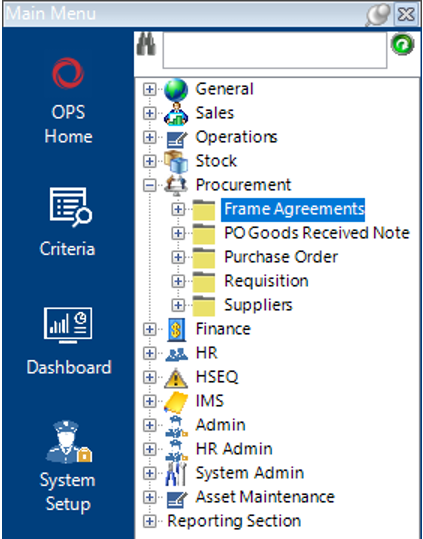
Locate the Frame Agreement Dataset
- Select the Procurement category, then Frame Agreements:
Add a Frame Agreement
- Select New Record>Frame Agreements or hit Insert on your keyboard.
- Fill in the relevant fields.
Note: (Pink = System Generated, Blue = Mandatory):
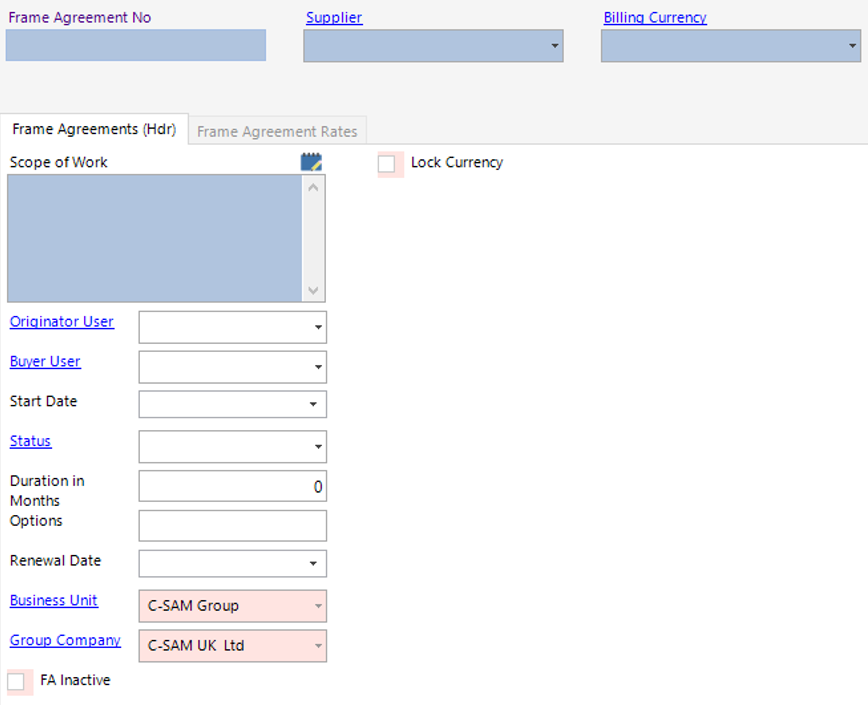
| Field | Description |
|---|---|
| Frame Agreement No | Manually enter the frame agreement number |
| Supplier | Select the relevant supplier from the drop down menu |
| Billing Currency | Select the relevant currency type |
| Frame Agreements (Hdr) | |
| Scope of Work | Text field to record the frame agreement scope of work |
| Originator User | Select the relevant name from the drop down |
| Buyer User | Select the relevant name from the drop down |
| Start Date | Select the start date of the frame agreement |
| Status | Select the status of the frame agreement |
| Duration in Months | Enter a value for the duration of the agreement |
| Options | Enter information of options if applicable |
| Renewal Date | Select the renewal date of the frame agreement |
| Business Unit | Defaulted to the Users Business Unit, or select appropriate |
| Group Company | Defaulted to the Users Group Company, or select appropriate |
- Select the Frame Agreement Rates tab:

- Select New Record>Frame Agreement Rates or hit Insert on your keyboard.
Fill in the relevant fields:
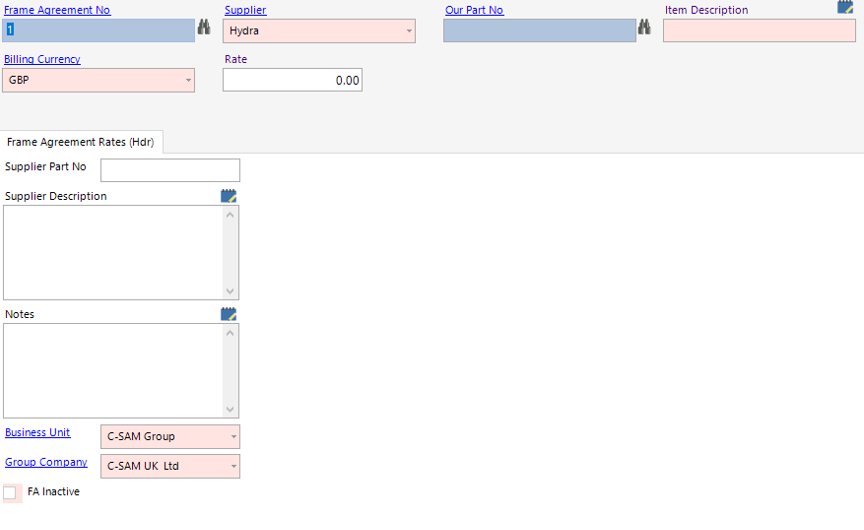
| Field | Description |
|---|---|
| Frame Agreement No | This will populate from the Frame Agreement Hdr |
| Our Part No | Select the relevant part no |
| Rate | Enter the rate value |
| Frame Agreement Rates (Hdr) | |
| Supplier Part No | Enter the supplier’s part no |
| Supplier Description | Enter the supplier’s description |
| Notes | Text field to hold additional information |
| Business Unit | Defaulted to the Users Business Unit, or select appropriate |
Note: You can add additional frame agreement rates by selecting the Next button.
- Select Close, then Refresh, the Frame Agreement Rates records will now show in grid view:

- Select Close.
The frame agreement has now been entered into the system.