
How to Create a RFQ
Requisitions can be logged in the C-SAM system for tracking.
How to Raise a RFQ
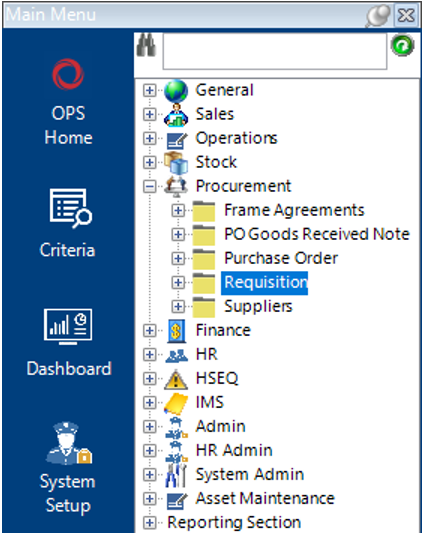
- Go to the Procurement category and select Requisition.
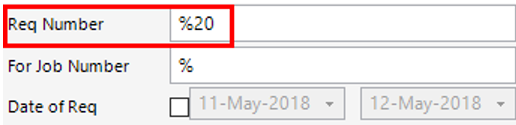
If you know the requisition number, type this into the Req Number field and select Search:
The record will appear in the grid:

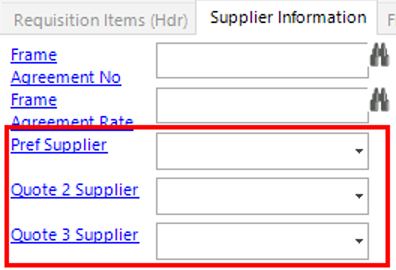
- Open the Requisition, select the Requisition Items tab, open the relevant records individually or select Open All, select the Supplier Information tab and enter the Suppliers details into the fields shown from whom the quotes are required from:
Select Close to return the Requisition (Hdr).
Select Functions>Create/Update RFQs.
- Select the RFQs tab:
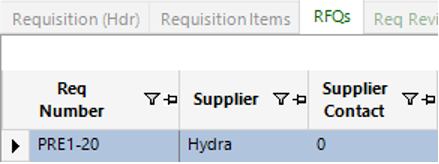
Either open each record individually or select Open All, and within each record you can either print or email the RFQ.
To Print the RFQ
Within the record, select Print>RFQ, this will take you to a print screen where you can review the quotation before printing.
To Email the RFQ
Within the Record, select Functions>Email RFQ. As long as you have set up contact details for that specific supplier you can email directly from the system which will then automatically create a correspondence record.